




Skip to product information
1 of 1

Carro Replacement Remote Wall Mount – DC Motor Fans

REMOTE WALL MOUNT

Regular price
$4.00
Regular price
$28.00
Sale price
$4.00
Shipping calculated at checkout.

All remotes include this remote wall mount. If you've already purchased a remote, there's no need to buy this wall mount separately. Replacement wall mount for Carro Home DC motor fan white remotes.
(Note: Remote control is not included. )

    All remotes include this remote wall mount. If you've already purchased a remote, there's no need to buy this wall mount separately. Replacement wall mount for Carro Home DC motor fan white remotes.
    (Note: Remote control is not included. )

    Shipping

    Free Shipping $39+

    Order Processing Time: Within 1-2 business days.

    Estimate Transit Time: Shipping takes 2-6 business days. (continental USA only)

    More details please see our shipping & receiving.

    RETURNS INFO
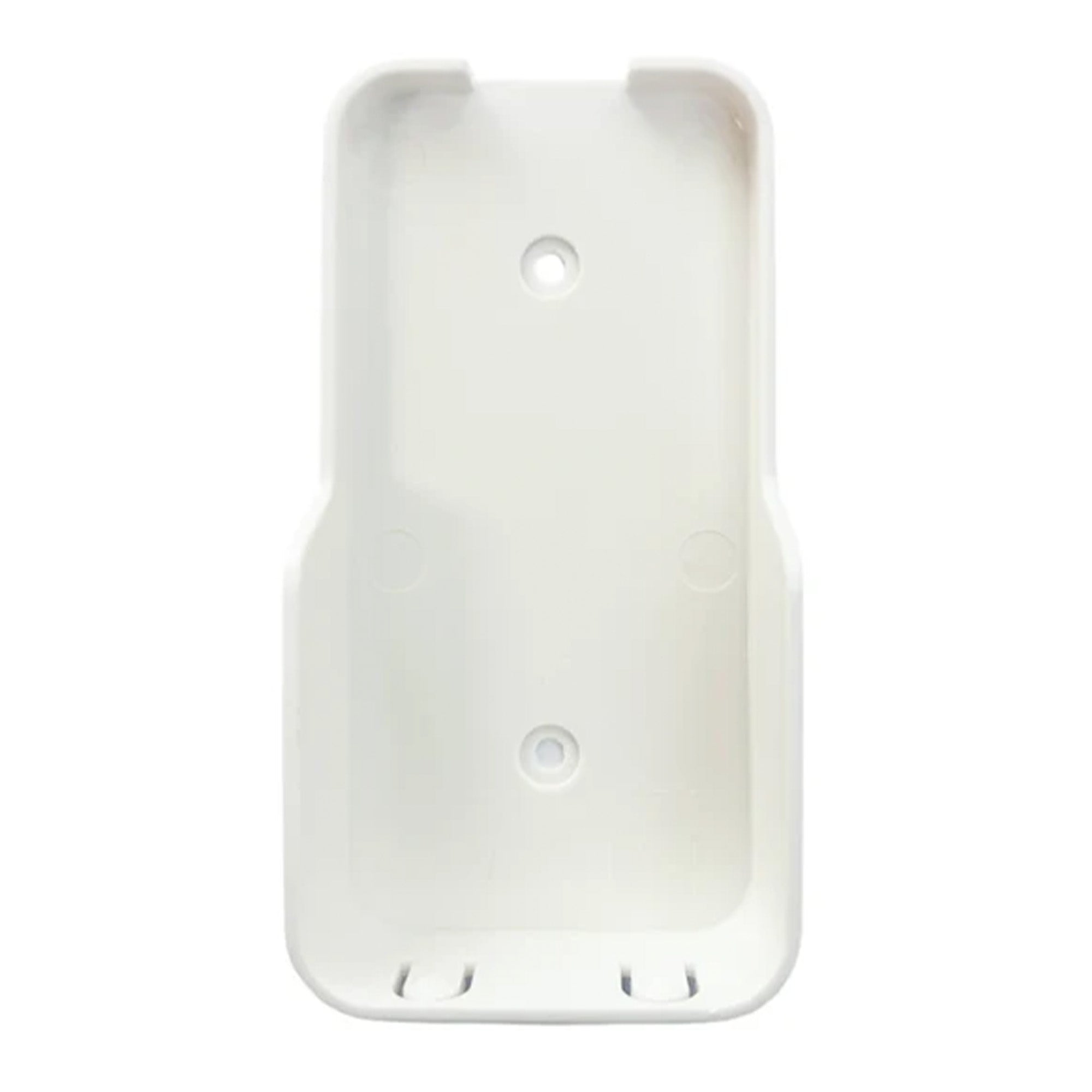
    White plastic wall mount bracket designed for Carro Home DC motor fan remotes. Features two screw holes for mounting and slots at the bottom for secure remote placement.

    Reviews

    FAQ

    What is the purpose of the remote wall mount?

    The wall mount keeps your remote securely stored in one easy-to-access place, helping prevent it from getting lost on sofas, tables, or countertops. It also allows the remote to function more like a convenient wall control.

    Is this Remote Wall Mount compatible with all Smafan ceiling fan remotes?

    No. This wall mount is only compatible with select white Carro remotes with model numbers beginning with “REMOTE-2” and is not universal for all Smafan remotes. The holder is specially designed to fit the size and shape of these white remotes for a secure wall-mounted installation and convenient storage. For compatibility help, contact .

    How to reset carro ceiling fan remote?

    When you doing the hard resetting procedure, you will need to disconnect the power from the unit entirely. Meaning either the fan needs to be unwired OR by turning off the breaker to the house.

    • After disconnecting the power from the unit, you must wait at least 10 minutes before connecting the power again.
    • After connecting the power, the remote must be paired with the unit again immediately within 20 seconds by holding down the "pair" or "√" button until you get a connection to the fan.
    • You may have to hold down the button for at least 10 seconds before the remote will correctly pair with the fan.

    If you experience other issues beyond remote resetting, please refer to our Troubleshooting Guide or contact us at cs@smafan.com for further support.

    Can I use one remote to control multiple same-function fans?

    Yes, a single remote can be paired to and control multiple ceiling fans at the same time.However, each fan can only be paired with one remote to prevent signal interference.

    Does the fan remember the last settings when turned off with the remote?

    Only ceiling fans with a power-off memory function can restore the previous settings after being turned off with the remote. When turned back on, the fan will resume the same speed and light settings as before. Standard models without memory will reset to default settings.

    Can I replace ceiling fan remotes?

    Yes. We offer a range of ceiling fan replacement parts and accessories, including downrods, remotes, smart switches, light kits, blades, light covers, and more. Before purchasing, please contact our customer service at cs@smafan.com to confirm compatibility with your model.

    Does the wall mount turn the remote into a wall control?

    Yes. Mounting the remote on the wall creates a more organized and wall-control-like experience without needing additional wiring.